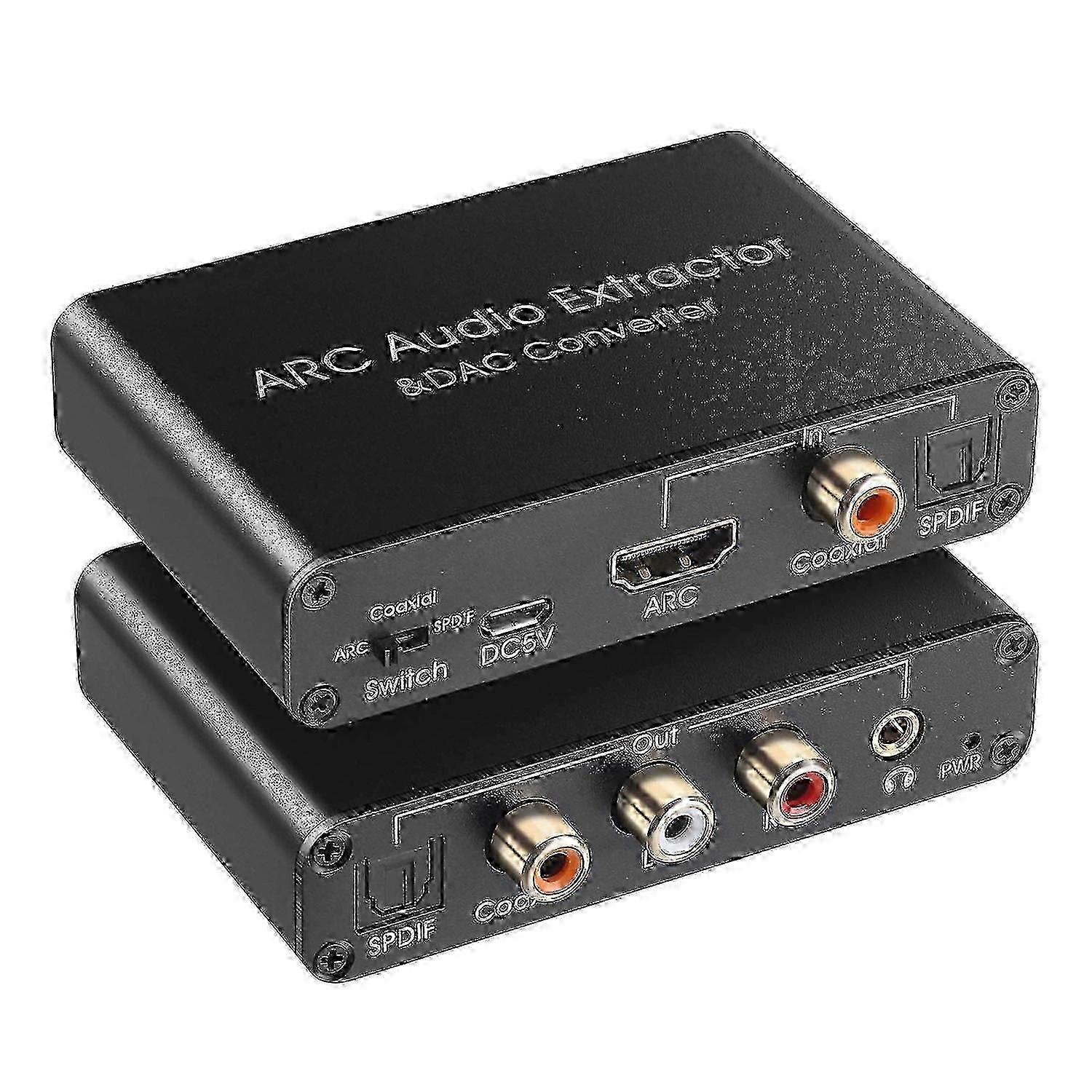
HDMI ARC Audio Extractor 192KHz DAC for Digital Audio Conversion Edition 0118
٢٬٣٩٩٫٠٠ E£
+ ١٬١٦٤٫٤٩ E£ الشحن

HDMI ARC Audio Extractor 192KHz DAC for Digital Audio Conversion Edition 0118
البائع:

٢٬٣٩٩٫٠٠ E£

وفّر ٧٬٨٩١٫٠٠ E£ (76%)

السعر الأصلي

١٠٬٢٩٠٫٠٠ E£
في المخزون
+ ١٬١٦٤٫٤٩ E£ الشحن

سياسة الإرجاع لمدة 14 يوما

طرق الدفع:

  • العلامة التجارية: Unbranded

تفاصيل المنتج

تفاصيل المنتج

HDMI ARC Audio Extractor 192KHz DAC for Digital Audio Conversion Edition 0118
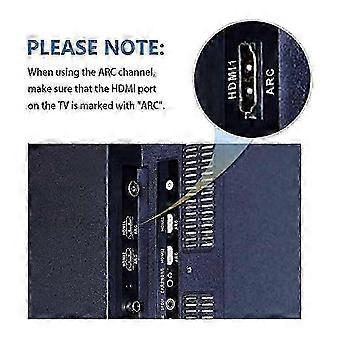
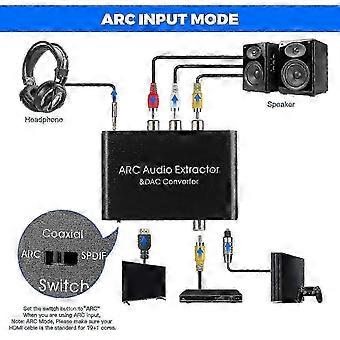
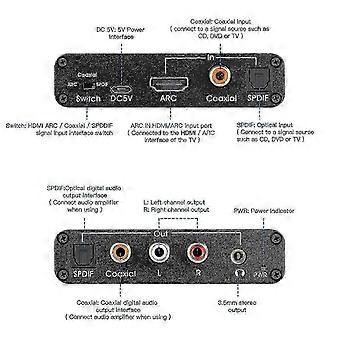
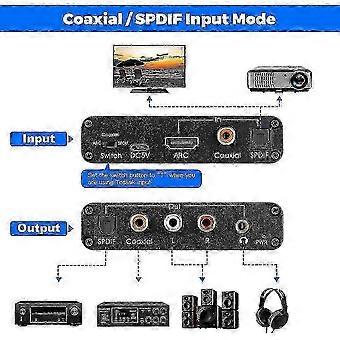
HDMI ARC Audio Extractor 192KHz DAC for Digital Audio Conversion Edition 0118 Usage Tips:[HDMI ARC Audio Extractor]Audio Return Channel function and audio extract to digital and analog signal.That means, when connected to HDMI ARC device,such as your TV with HDMI ARC port,audio will be return from TV and output to SPDIF,Coaxial,L+R RCA,3.5mm;Note: Please set your TV audio output to PCM, LPCM [192KHz DAC Digital to Analog Converter]Input SPDIF or Coaxial Digital signal,Output to L+R Analog Audio,3.5mm Jack stereo sound;Note: Please set your TV audio output to PCM, LPCM [HDMI ARC CEC Volume Adjustable]When switch to HDMI ARC mode, volume can be countrolled by TV's remote controller (Attention: CEC is only for HDMI 1.4 version or ab ove,both of your device and HDMI cable must be required,Don't forget to set the CEC control configurations of your TV,or else not available for volume control) [SPDIF to Coaxial Bidirection Converter]SPDIF (Toslink/Optical) convert to Coaxial, Coaxial convert to SPDIF(Toslink/Optical); [Mini Size and Easy to Use]Aluminum shell,Small size,portable,compatible with for Blu-ray DVD,HDTV,TV,TV Box,Game playstation PS2,PS3,PS4,Xbox Style: HDMI ARC Audio Extractor Audio format: PCM Audio Sampling rate: 192Khz Mode choice: ARC, coaxial, optical Size:4 x 2.4 x 0.8 inches Setting Method: Please Set the Audio Output to PCM or LPCM before Using; Connection and Operation: 1. Connect the HDMI port of the adapter to the HDMI (ARC) port of the TV through the HDMI cable 2. Connect the converter's optical fiber and coaxial input port with the corresponding audio interface of DVD or PS3 through optical fiber cable or coaxial cable 3. Connect to the amplifier system through optical fiber cable, coaxial cable or RCA cable and 3.5mm audio cable 4. Connect the USB power cord to the Micro-USB interface of the converter 5. Switch to the corresponding audio by flipping the switch Material:Aluminum alloy colour:black PackageContents: 1 *
  • هوية Fruugo: 476270829-993290314
  • EAN: 8544599923996
السلامة

معلومات سلامة المنتج

يرجى الاطلاع على معلومات سلامة المنتج الخاصة بهذا المنتج الموضحة أدناه

يتم توفير المعلومات التالية من قبل بائع التجزئة المستقل التابع لجهة خارجية الذي يبيع هذا المنتج.

ملصقات سلامة المنتج

CE Mark
تحذيرات السلامة: Important Safety Instructions Read Before Use: Please read all instructions and safety warnings before using this product. Failure to follow these guidelines may result in injury, damage, or malfunction. General Warnings Intended Use: Use this product only for its intended purpose as described in the user manual. Supervision Required: This product is not intended for use by children or persons with reduced physical, sensory, or mental capabilities without supervision. Inspection Before Use: Check for any signs of damage or wear before use. Do not use if damaged.

التوصيل

توصيل

يُرسل خلال ٤ أيام

  • STANDARD: ١٬١٦٤٫٤٩ E£ - التسليم بين الاثنين 12 أكتوبر 2026 – الخميس 29 أكتوبر 2026

يُشحن من الصين.

الإرجاع

الإرجاع

نحن نبذل قصارى جهدنا لضمان أن تصلك المنتجات التي تطلبها بالكامل وطبقاً المواصفات التي حددتها. إلا أنه في حال تلقيك طلب غير كامل أو أغراض تختلف عن تلك التي طلبتها أو كان هناك سبب آخر يدعوك لعدم الرضاء عن الطلب، فيمكنك رد الطلب أو أي منتجات يتضمنها الطلب واسترداد ما دفعته من أجل تلك الأغراض بالكامل.

عرض سياسة الرد الكاملة